Running AI Models on Raspberry Pi: A Practical Deployment Guide
The Raspberry Pi has matured into a viable edge-AI platform — but which models actually fit, how fast do they run, and how do you deploy them reliably in production? This guide focuses specifically on Pi: model selection, honest performance expectations, optimisation techniques, and real deployments from our own shipped products. For the broader question of when to run AI on-device versus in the cloud, see our edge AI vs cloud AI comparison.



Why Raspberry Pi Is Now a Serious Edge AI Platform
The Raspberry Pi 4 brought edge AI within reach for embedded product teams — full Linux, Python, and enough RAM to load small models. The Pi 5 made it practical for production. The BCM2712 SoC packs quad-core ARM Cortex-A76 cores running at 2.4 GHz, paired with up to 8 GB of LPDDR4X RAM. That is not a microcontroller's compute headroom — it is a substantial step up from the Cortex-A72 in the Pi 4, and the difference shows up directly in inference latency.
Raspberry Pi also now has a first-party AI acceleration path. The Hailo-8L (13 TOPS) is available via the Raspberry Pi AI Kit and AI HAT+, and the Hailo-8 (26 TOPS) via the AI HAT+, both connecting over the Pi 5's M.2 slot. These are not required for lightweight models, but they change the ceiling for higher-throughput computer vision workloads substantially. Per the Raspberry Pi Foundation's published documentation, the AI HAT+ with Hailo-8 enables real-time object detection at resolutions and frame rates that Pi CPU alone cannot sustain.
Pi is not a Jetson, not a workstation. For multi-stream HD object detection or large language model inference, it is not the right platform. But for a wide class of production tasks — computer vision at modest frame rates, face recognition for access control, small speech models, sensor-based anomaly detection — Pi 5 is the right cost/power/capability point: mains-powered, a £60–£80 board, the full Linux ecosystem, and standard Python libraries. For a broader view of where embedded AI is heading across all platforms, the broader future of embedded AI covers the landscape from microcontrollers through to the Pi class and beyond.
Which AI Models Actually Run on Raspberry Pi
Computer Vision
YOLOv8n (nano) is the standard starting point for object detection on Pi. It is the smallest variant in the YOLOv8 family and the one Ultralytics explicitly positions for resource-constrained deployment — the variant name "n" for nano is the signal. On Pi 5 with an optimised runtime (NCNN or TFLite rather than PyTorch), it achieves frame rates suitable for many production applications. YOLOv8s, YOLOv8m, and larger variants are significantly slower — on Pi CPU alone they are not suitable for real-time use. If you are starting a new CV project on Pi, begin with YOLOv8n and only step up to a larger variant if accuracy profiling on your specific dataset demands it.
YOLOv5n remains in use on legacy deployments and is a valid choice if your tooling is already built around it. The same size constraint applies: nano variant only for real-time Pi inference.
MobileNet-SSD and other MobileNet-family classifiers are well-suited to Pi via TFLite. Designed for mobile and edge from the start, they are efficient on ARM and integrate naturally with the Coral USB Accelerator if you want hardware-assisted throughput on TFLite models.
OpenCV with the face_recognition library (dlib-based) is the practical choice for face recognition authentication tasks — not continuous high-FPS tracking, but event-driven recognition (door approach, button press) where you process one frame per trigger. On Pi 5, the dlib recognition pipeline is suitable for access-control response times. This is what we use in our FZLockers deployment.
Speech Recognition
Whisper tiny / base via whisper.cpp is the standard approach for speech-to-text on Pi. whisper.cpp is a C++ port of OpenAI's Whisper that runs significantly faster than the original Python implementation, making the tiny and base model variants practical on Pi 5 hardware. For lighter wake-word detection where Whisper's footprint is excessive, Vosk and Porcupine are alternatives with lower resource requirements and sub-second latency.
Classical ML and Sensor Inference
Scikit-learn models — random forests, gradient boosting, SVMs — exported to ONNX or Joblib are extremely fast on Pi: millisecond-class inference for tabular sensor data. Anomaly detection, predictive maintenance classification, and real-time sensor stream processing are all well within Pi's capability without any hardware acceleration. This category covers a large proportion of real production edge AI use cases and is often overlooked in favour of flashier computer vision work.
Large Language Models — Be Honest About the Limits
Small quantised LLMs — TinyLlama 1.1B or Phi-2 at Q4 quantisation via llama.cpp — will run on Pi 5 with 8 GB RAM. They are slow: expect single-digit tokens per second. This is batch-only territory, not interactive. A Pi running a local LLM can serve use cases where response latency is not critical — generating a short status report overnight, for example. For anything requiring conversational response times, Pi is not the right inference platform. Run the LLM server-side and use the Pi as the interface and orchestration layer.
What to Expect: Performance on Raspberry Pi
Real performance depends on model variant, input resolution, runtime format, and whether a hardware accelerator is present. The table below uses qualitative descriptors and source attributions rather than specific numbers we have not independently measured — the most harmful thing in an engineering guide is a benchmark you cannot reproduce. Where Ultralytics or the Raspberry Pi Foundation have published benchmarks, we note the source and point to their documentation for the specific figures.
| Model / Library | Task | Pi Hardware | Performance Notes |
|---|---|---|---|
| YOLOv8n (NCNN or TFLite) | Object detection | Pi 5 (4 GB) | Near-real-time for many production applications. Per Ultralytics documentation, YOLOv8n is the recommended variant for resource-constrained deployment. Use NCNN or TFLite runtime — not PyTorch. |
| YOLOv8n (NCNN or TFLite) | Object detection | Pi 4 (4 GB) | Slower than Pi 5; may meet application requirements at reduced resolution. Pi 5 is strongly preferred for CV workloads — the Cortex-A76 vs A72 gap is significant for inference. |
| YOLOv8s / m / l | Object detection | Pi 5 (CPU only) | Not suitable for real-time use on Pi CPU alone. Use YOLOv8n, or add Hailo HAT acceleration if a larger model is required for accuracy. |
| OpenCV + face_recognition (dlib) | Face recognition | Pi 5 | Suitable for event-driven access control at the response times required for door-entry or locker-access use cases. Not designed for continuous high-FPS tracking. Verified in our FZLockers deployment. |
| MobileNet-SSD (TFLite) | Object classification | Pi 4 / Pi 5 | Designed for mobile and edge from the ground up; efficient on ARM. Good baseline for classification tasks. Compatible with Coral USB Accelerator for higher throughput. |
| Whisper tiny (whisper.cpp) | Speech-to-text | Pi 5 | Faster than real-time for short utterances. Practical for command recognition and short-form transcription. whisper.cpp (C++) is substantially faster than Python Whisper for Pi. |
| Whisper base (whisper.cpp) | Speech-to-text | Pi 5 | Near-real-time to slightly above real-time for short-to-medium utterances. Higher accuracy than tiny; still practical for production short-form use cases on Pi 5. |
| scikit-learn / ONNX | Sensor anomaly detection / classification | Pi 4 / Pi 5 | Millisecond-class inference for tabular sensor data. No practical performance concern at any Pi version. Well within CPU capability without acceleration. |
| TinyLlama 1.1B Q4 (llama.cpp) | Text generation (LLM) | Pi 5 (8 GB) | Runs but slow — single-digit tokens per second. Batch or offline workloads only; not suitable for interactive chat. Use server-side LLM inference for production interactive use. |
| YOLOv8n + Hailo HAT+ | Object detection | Pi 5 + Hailo-8 (26 TOPS) | Substantially higher throughput than CPU alone. Per Raspberry Pi Foundation AI HAT+ documentation, real-time detection at higher resolutions and frame rates is achievable. See Pi Foundation benchmarks for model-specific figures. |
All performance descriptors ("near-real-time", "faster than real-time") reflect models running at production-relevant input sizes, not minimal test cases. Profile on your specific hardware and input pipeline before finalising platform decisions.
Real Deployments: DigitalMonk Projects on Raspberry Pi
Edge AI on Pi is not theoretical for us. The following are confirmed shipped deployments and capabilities from DigitalMonk's production work.
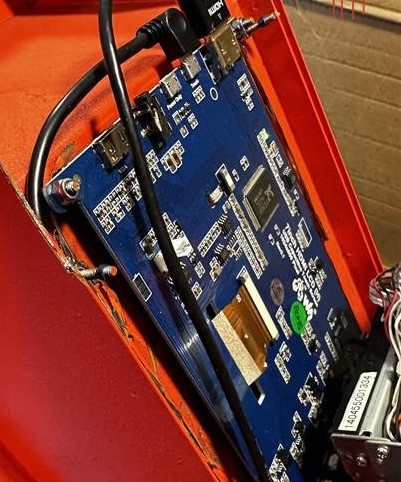
FZLockers — Face Recognition Access Control (UK)
A Pi 5-based smart locker system deployed at the client's site in the UK. Users approach a locker bank and are authenticated via face recognition — no card, no PIN required. We built the computer vision pipeline using OpenCV and the face_recognition library (dlib-based). The Pi 5 handles recognition within a response window suitable for locker-access use.
Pi was the right platform here: the full software stack — Python, OpenCV, dlib, SQLite for the access log, a local management interface — runs naturally on Linux. The images shown were provided by the client from the deployed site.
Raspberry Pi 5OpenCVface_recognitionPythonAccess Control
Smart Vending Fridge Conversion
Converting standard refrigerators into smart vending units. A Pi 5 with a camera watches the fridge interior. When a customer opens the door and removes an item, a lightweight YOLOv8 model running on the Pi identifies the product, triggers the solenoid lock sequence, and debits the customer's account — all within the door-close window.
On-device inference is non-negotiable here: the unlock and debit action must complete within the door interaction window. A cloud round-trip would add unacceptable latency and fail entirely when connectivity drops. Local Pi inference eliminates both risks.
Raspberry Pi 5YOLOv8Object DetectionSolenoid ControlThe AI Deployment Pipeline on Raspberry Pi
Deploying an AI model to Pi is a pipeline, not a single step. Getting each stage right — from model selection through runtime choice to the capture pipeline — is what separates a prototype that works on a desk from a system that holds up in production. The diagram below shows the six stages every Pi AI deployment goes through.
You start with a model: either a pre-trained one (YOLOv8n weights, Whisper tiny, an OpenCV classifier) or one trained on your own data using cloud GPU resources. That model almost certainly is not ready to run on Pi in its native format — it needs to be optimised. Quantisation (FP32 to INT8) cuts memory footprint and speeds up inference with a small, usually acceptable accuracy trade-off. Format conversion — from PyTorch or TensorFlow to ONNX, then to TFLite or NCNN — is necessary to reach the most efficient Pi runtime. Once optimised, the model file lands on the Pi alongside the Python or C++ runtime that runs it. The input pipeline (camera, mic, sensors) feeds frames or audio into inference, and inference drives the application action: unlocking, logging, transcribing, dispensing.
Fig. 1 — The six-stage AI deployment pipeline on Raspberry Pi. Stage 2 (optimisation) and Stage 5 (runtime format) are the decisions most teams underestimate; they have the largest impact on production inference performance.
Optimising AI Models for Raspberry Pi
These are the techniques that make the most measurable difference in practice, drawn from building Pi AI systems in production.
- 1Quantise to INT8
Converting from FP32 to INT8 quantisation typically halves memory footprint and significantly speeds up inference, with a small and usually acceptable accuracy trade-off. For most production CV tasks the accuracy loss is imperceptible; for sensor-data anomaly detection it is typically negligible. Quantisation is not optional on Pi — it is table stakes for any model that needs to run at production throughput.
- 2Choose the right runtime format
PyTorch and TensorFlow are training frameworks — not efficient inference runtimes for ARM. Convert to ONNX first, then to TFLite or NCNN for Pi deployment. NCNN is particularly efficient on ARM CPUs. whisper.cpp is the correct runtime for Whisper models — not Python Whisper. Each format choice has a measurable impact on inference latency; don't benchmark in PyTorch and deploy in PyTorch.
- 3Use the smallest model that meets your accuracy threshold
The jump from YOLOv8n to YOLOv8s is a meaningful accuracy gain — and a meaningful performance cost. Establish your minimum acceptable accuracy on your specific dataset and test the smallest model that hits it. Many teams default to larger variants unnecessarily; YOLOv8n often meets production requirements and runs substantially faster. The same logic applies to Whisper: tiny before base, base before small.
- 4Optimise the camera and capture pipeline
Camera capture, resizing, and pre-processing are a significant portion of total pipeline latency — not just inference. Use V4L2 or libcamera directly rather than OpenCV's default capture backend where possible. GStreamer pipelines with hardware-accelerated decode improve throughput. Profile the full pipeline from frame grab to result, not just inference time in isolation.
- 5Thread capture and inference separately
Running frame capture and inference in the same thread means each blocks the other. Put capture on a producer thread feeding a bounded queue; inference runs on a consumer thread pulling from it. This decouples the two pipelines, prevents frame drops during slower inference frames, and makes the overall system more responsive under variable load.
- 6Plan for thermals under sustained load
Raspberry Pi 5 will throttle under sustained CPU-intensive workloads without active cooling. Running continuous inference — the norm in CV deployments — is exactly the kind of sustained load that triggers thermal throttling and unpredictable latency. Use the official Pi 5 active cooler or an equivalent heatsink-with-fan solution. Active cooling is a deployment requirement, not a nice-to-have.
- 7Load the model once at startup
Loading a model from disk allocates weights, initialises buffers, and compiles the computation graph — this takes seconds. In a production service, load once at startup and keep it resident in memory. Reloading per request is a common mistake that makes performance appear 10–100× worse than the model actually is. Use a persistent service (systemd unit) rather than a script that exits between runs.
- 8Add hardware acceleration after establishing the CPU baseline
If profiling shows the Pi CPU cannot meet your target frame rate or latency, the Hailo HAT (13 TOPS) or Hailo HAT+ (26 TOPS) are the first-party Pi acceleration options for CV workloads. The Coral USB Accelerator is an alternative for TFLite-compatible models. Measure first — many applications find Pi 5 CPU alone is sufficient, and hardware acceleration adds cost and integration complexity that is only justified when profiling proves it is needed.
Common Mistakes in Raspberry Pi AI Deployments
- ✕Benchmarking with unquantised PyTorch models
Measuring Pi inference performance with a raw FP32 PyTorch model gives you a worst-case number, not a production-representative one. Convert and quantise first; then benchmark. Teams that skip this step incorrectly conclude Pi is too slow.
- ✕Demanding server-class frame rates
Pi is not a $3,000 GPU workstation. Define the minimum acceptable frame rate for your application — not the maximum possible — and test against that. Many production use cases need 2–10 FPS, not 60.
- ✕Ignoring thermals
A Pi 5 running sustained inference without active cooling will throttle and produce inconsistent latency. Thermals are a deployment engineering requirement, not an afterthought. Test under sustained load — not just for five seconds.
- ✕Not pinning Python and library versions
TFLite, NCNN, OpenCV, and dlib bindings change across versions and can break each other. Pin your virtualenv or use a locked container image for production deployments. Uncontrolled package upgrades on a deployed Pi will break inference quietly.
- ✕Deploying without monitoring
Edge AI systems require ongoing monitoring: inference latency, model accuracy over time as environmental conditions change, and hardware health (temperature, uptime). A model that was accurate at launch can degrade. Build structured logging and alerting in from day one.
Why DigitalMonk for Edge AI on Raspberry Pi
We don't just write Python inference scripts on Pi. Our edge AI engagements cover the full stack: model selection and optimisation, runtime format conversion, the camera capture and inference pipeline, thermal design, hardware enclosure, and the cloud backend the Pi reports to. FZLockers and the smart vending conversion are not demos — they are production systems running at client sites.
If you are evaluating whether Pi is the right platform for your AI product, or have already committed to Pi and need engineering support to get it to production, the hire Pi developers with edge AI experience page details our engagements and how we work. For the broader scope of what we build across embedded AI platforms, see our embedded AI development services.

DigitalMonk — Raspberry Pi Developers
Model optimisation through production deployment — Pi AI, firmware, cloud backend, and hardware design. UK, US, and India.
Frequently Asked Questions
- Yes — with the right model size and runtime format. Raspberry Pi 5 runs TensorFlow Lite, ONNX Runtime, PyTorch Mobile, and NCNN natively via Python or C++. Lightweight object detection (YOLOv8n), face recognition (OpenCV + dlib), speech-to-text (Whisper tiny/base via whisper.cpp), and scikit-learn sensor models all run well in production. The key constraint is model complexity: nano and tiny variants are the productive range for Pi CPU inference. With a Hailo HAT or Hailo HAT+ accelerator attached, the ceiling rises substantially for computer vision workloads.
- Pi 5, by a meaningful margin. The Pi 5 uses the BCM2712 SoC with quad-core ARM Cortex-A76 cores at 2.4 GHz and LPDDR4X memory. The Pi 4 uses BCM2711 with Cortex-A72 at 1.5 GHz. The Cortex-A76 is a significantly more capable core — a newer microarchitecture with better out-of-order execution and a higher IPC. For AI inference, this difference is substantial: workloads that ran near the edge of feasibility on Pi 4 often run comfortably on Pi 5. Pi 5 also has better support for active cooling and the M.2 slot for the Hailo HAT+, which Pi 4 lacks.
- It depends on the variant, runtime format, and what 'real time' means for your application. YOLOv8n (nano) is the smallest YOLOv8 variant and the one Ultralytics explicitly positions for resource-constrained deployment. On Pi 5 with an optimised runtime (NCNN or TFLite, not PyTorch), it achieves frame rates suitable for many production CV applications. YOLOv8s and larger variants are significantly slower on Pi CPU alone — not practical for real-time use without a Hailo HAT. If you need multi-stream or high-FPS detection beyond what Pi CPU allows, the Hailo HAT+ (26 TOPS) changes the equation substantially.
- Yes — whisper.cpp (a C++ port of OpenAI's Whisper) is the right tool for this on Pi. The tiny and base model variants are the practical size range. On Pi 5, whisper.cpp processes short utterances faster than real-time, making it suitable for command recognition and short-form transcription. The original Python Whisper is substantially slower and not the correct approach for Pi deployment; whisper.cpp is the standard for resource-constrained hardware and is what we use in our own Pi speech deployments.
- Not necessarily — establish your CPU baseline first. For YOLOv8n-class computer vision at modest frame rates, or speech recognition with whisper.cpp, Pi 5 CPU alone may meet your application's requirements. Profile on your actual hardware and input pipeline before buying accelerators. If the CPU alone cannot hit your target frame rate, the Hailo HAT (Hailo-8L, 13 TOPS) and Hailo HAT+ (Hailo-8, 26 TOPS) are the first-party Pi acceleration options for CV workloads. The Coral USB Accelerator from Google is an alternative for TFLite-compatible models. Add hardware acceleration after profiling confirms it's needed.
- For computer vision workloads — YOLOv8n, face recognition, MobileNet-SSD — 4 GB is a comfortable baseline. It leaves headroom for the OS, camera pipeline, and any application logic running alongside inference. 2 GB is technically sufficient for single lightweight models but leaves little margin. For small quantised LLMs (TinyLlama 1.1B, Phi-2 Q4 via llama.cpp), 8 GB is recommended. Avoid the 1 GB Pi variants for any AI inference use case — they will hit memory pressure with even lightweight models when the OS and runtime are loaded.
- When the application needs multi-stream HD inference at production frame rates, large transformer models (3B+ parameters) for interactive use, hard real-time control running simultaneously with heavy inference, or sustained throughput that Pi CPU cannot meet even with a Hailo HAT+. In those cases: NVIDIA Jetson Orin NX or Orin Nano for embedded edge AI, or server-side inference for non-latency-sensitive workloads. Pi is the right platform when it genuinely fits the requirement — and the wrong platform when it doesn't. Profile early, decide on evidence.
Building an Edge AI Product on Raspberry Pi?
DigitalMonk has shipped Pi-based AI systems in production — computer vision for access control, on-device object detection for smart vending, and voice AI for client products. Tell us what you are building.
Talk to our Raspberry Pi developers →