ESP32 Power Optimization:
Building Battery-Powered IoT Devices
Battery life is the difference between a prototype and a product.
In real-world IoT deployments — whether it's smart meters, BLE trackers, or industrial sensors — you're not optimizing for performance. You're optimizing for months (or years) of uptime on a tiny battery.
And this is exactly where most ESP32-based products fail. Teams enable "deep sleep," see decent numbers on a multimeter, and assume everything is fine — until the device dies in 3 days instead of 3 months.
This guide breaks down ESP32 power optimization from a product engineering perspective, not just a tutorial. We'll cover:
- ⚡ Light sleep vs deep sleep vs hibernation (with real numbers)
- 🔌 Wake-up sources and architecture decisions
- 📏 Why your current measurements are wrong
- 💾 Practical firmware strategies
- ⛳ Real-world learnings from a Smart Golf Ball project
Understanding ESP32 Power States
ESP32 offers multiple power-saving modes, but they are not interchangeable. Choosing the wrong one can destroy your battery life.
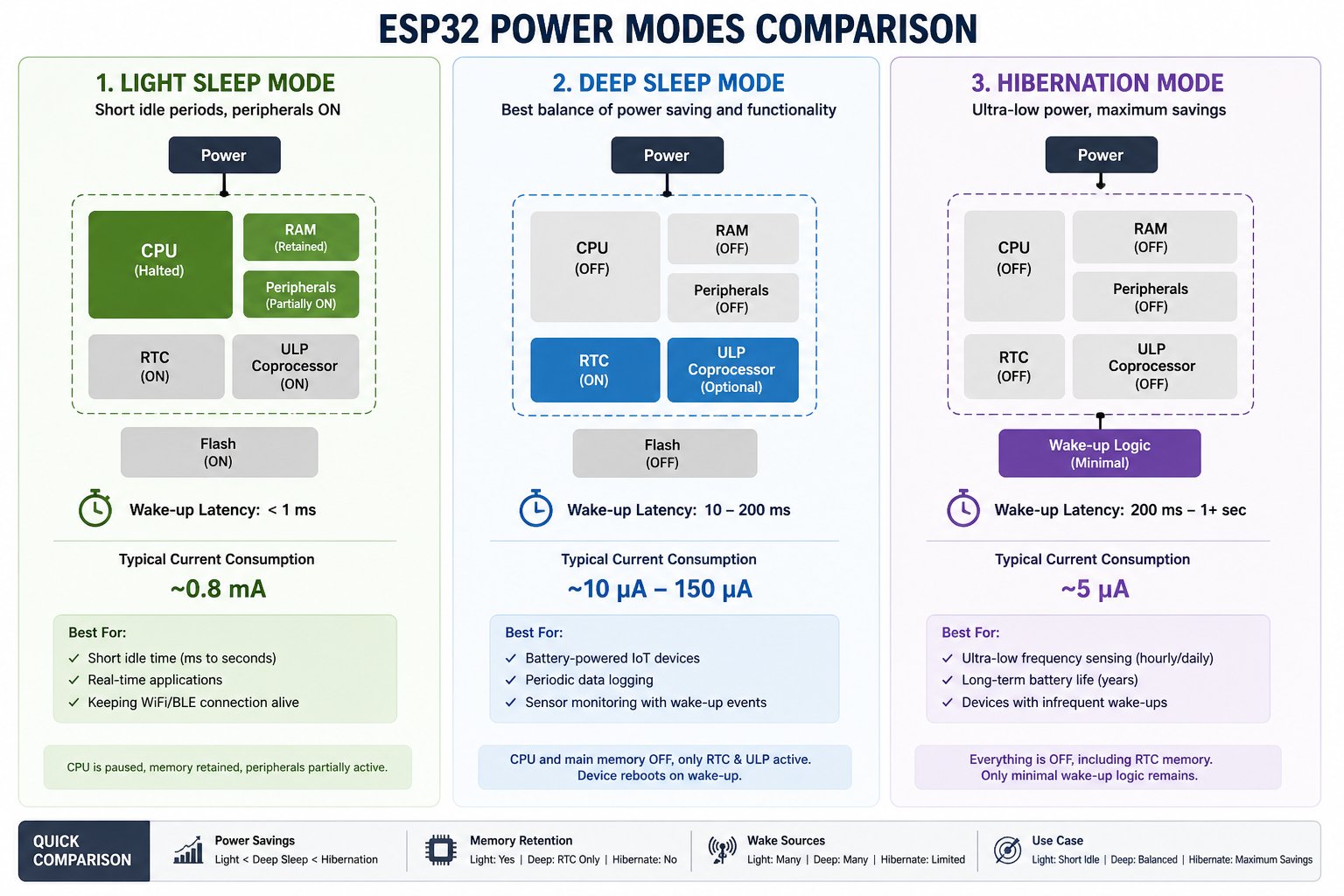
ESP32 Power Modes Comparison — Light Sleep vs Deep Sleep vs Hibernation
Light Sleep Mode
Short idle periods, peripherals ON
Light sleep is essentially a paused system, not a powered-down one.
✅ Use for
- Short idle periods (ms to seconds)
- Real-time applications
- Maintaining WiFi/BLE context
❌ Avoid when
- Battery-powered devices needing weeks/months uptime
Reality check: 0.8 mA sounds small, but that's ~800 µA. On a 1000 mAh battery, that's roughly 50 days max (ideal) — and far less in real usage.
Deep Sleep Mode
Best balance of power saving & functionality
This is where real IoT products live.
✅ Best for
- Battery-powered IoT devices
- Periodic data logging
- Sensor monitoring with wake-up events
Key Behavior
- Device reboots on wake-up
- Only RTC memory persists
- ULP can run simple logic
Hibernation Mode
Ultra-low power, maximum savings
The lowest power state possible — everything off.
✅ Use for
- Ultra-low frequency sensing (hourly/daily)
- Long-term battery life (years)
- Devices with infrequent wake-ups
⚡ Tradeoffs
- No memory retention
- Limited wake sources
- More complex state recovery
Wake-Up Sources
Choosing the right sleep mode is only half the equation. The wake-up source directly affects power consumption.
Timer wake-up
Scheduled interval trigger
Wakes after a fixed interval. Cleanest option — no external signals, minimal hardware overhead.
esp_deep_sleep_start();
External GPIO
EXT0 / EXT1 interrupt
Triggered by buttons, sensors, or interrupts. EXT1 costs far less than EXT0 — but most engineers default to EXT0 without thinking.
Touch wake-up
Capacitive sensing
Capacitive touch pins can wake the device. Useful for wearables, but costs 3× more than timer or EXT1.
Where most designs go wrong
- Teams pick EXT0 instead of EXT1 by habit
- Unnecessary peripherals left active during sleep
- Result: 10× higher sleep current than intended
Why Your Numbers Lie
ESP32 current is not stable. It swings by 5 orders of magnitude — and most engineers never see it.
Multimeter
The default — and the problem
Current probe / PPK2
What you actually need
A multimeter reading looks fine because it averages the 5 µA sleep floor with the 500 mA WiFi burst. You ship the device. The battery dies in days. The spike was always there. You just couldn't see it.
When your baseline reading is wrong by 3500×, every optimization decision built on top becomes meaningless. You tune the wrong thing and ship a device that dies in days.
Shunt resistor + oscilloscope
1Ω shunt resistor in series — voltage across it equals current in mA directly
Oscilloscope to capture full waveform at kHz+ sample rate
Requires manual setup — sufficient but not convenient
Nordic Power Profiler Kit II
100k samples/sec — resolves every µA and mA spike with precision
Software UI shows full waveform, averages, and peak annotations in real time
Covers nA to 1A range — sees both deep sleep floor and WiFi burst in one view
Measure waveforms, not averages. A flat average number conceals the spikes that kill battery life.
Validate deep sleep after 30+ seconds of stabilization. Capacitors and RTC clocks need time to settle before the true floor is visible.
Dev Boards vs Real Hardware
This is where many IoT teams get burned. The chip is efficient. The board around it isn't.
Never optimize power on a development board. Always test on production hardware — or at minimum, desolder the LEDs and disable the UART chip before any sleep current measurement counts.
Optimization Strategies
Kill WiFi fast
Biggest impactWiFi is your largest power consumer. Disable it the moment transmission is complete — every millisecond it stays on burns current.
WiFi.mode(WIFI_OFF);
btStop(); // disable BT too if unused
Reduce active time
ArchitectureEvery second awake costs you. Restructure your wake cycle so the device moves from power-on to sleep as fast as possible with no idle hanging.
Use RTC memory
PersistenceRTC memory survives deep sleep. Store state that would otherwise require a fresh operation every wake cycle.
RTC_DATA_ATTR float lastTemp = 0.0;
// survives deep sleep — no re-init needed
Skip unnecessary operations on boot
Cache sensor state between cycles
Count boots to schedule infrequent tasks
Store calibration to skip re-calibration
ULP coprocessor
AdvancedThe Ultra-Low Power coprocessor runs independent of the main CPU. Use it to poll sensors or detect thresholds — only waking the main CPU when something actually needs attention.
Smart Golf Ball — Real Product Thinking
Power optimization isn't abstract. Here's what it looks like when it has to fit inside a golf ball and run for months on a coin cell.
BLE-based IoT ball with 9-axis IMU & ultra-low power firmware
A fully autonomous smart ball with onboard processing, power management, and wireless connectivity — no external wearables, no external sensors.
Deep sleep when idle — main processor off between motion events
Wake-on-motion triggers — IMU interrupt wakes system only on impact or swing
Efficient BLE advertising intervals — tuned to minimize radio-on time
Sensor duty cycling — sensors powered only during active measurement windows
RF inside dense enclosures requires careful antenna design — the ball material attenuates signal.
Battery optimization must be planned at firmware architecture level — not bolted on at the end.
BLE stability depends on packet design and connection intervals — not just signal strength.
Mechanical and electronics integration is critical — PCB placement affects both balance and RF performance.
Excellent prototype development with expert team, timely delivery, and innovative solutions.
ESP32 always on, continuous BLE
Event-driven deep sleep cycle
~2.5 µA
IMU snapshot
BLE send packet
immediately
The biggest win wasn't a hardware change, a better battery, or a lower-power chip. It was a shift in how the firmware was architected.
React to events, don't poll continuously — let interrupts drive the cycle
Minimize time awake — every ms active is energy spent
Sleep is the default state, not an afterthought
Battery Life Calculation
A simple model that tells you whether your sleep strategy will hit your target — before you build anything.
Real-world efficiency factor: multiply by 0.7 to 0.8 to account for battery voltage sag, temperature, and DC-DC converter losses. A 154-day theoretical result is roughly 108 to 123 days in practice.
Common Mistakes That Kill Battery Life
ADC, Bluetooth, and WiFi left running in deep sleep. Each silently draws current even when your code is not using them.
Call WiFi.mode(WIFI_OFF), btStop(), and disable the ADC before entering sleep. Do not assume the SDK turns them off.
EXT0 is the default choice but it pulls 50 to 100 uA during sleep versus EXT1 at around 10 uA.
EXT1 supports multiple pins and costs around 10 uA. Unless you have a hard reason to use EXT0, always reach for EXT1 first.
A multimeter samples 2 to 3 times per second. It completely hides 500 mA WiFi spikes that last milliseconds.
Use a Nordic PPK2 or oscilloscope with a shunt resistor. Validate deep sleep only after 30 or more seconds of stabilization.
Dev boards include power LEDs, USB-UART chips, and regulators that draw 0.5 to 2 mA constantly, even in deep sleep.
Removing a single power LED can drop current from 1 mA to 8 uA. Never use dev board numbers as your production baseline.
Waking on a timer to check whether something happened keeps the CPU active unnecessarily. Most checks return nothing.
Use GPIO interrupts, IMU thresholds, or ULP coprocessor triggers. Wake only when something actually needs attention.
Design Checklist for ESP32 Battery Devices
Six things to verify before your product leaves the bench. Tick them off as you go.
Power optimization is not just writing esp_deep_sleep_start()
Getting it right in production involves the full stack - firmware architecture, hardware design, measurement techniques, and real-world testing. Most teams only get the first one.
ESP32 is powerful but power-hungry by default.
The chip will not save your battery life on its own. That job belongs to how you architect the firmware, how you design the hardware, and how honestly you measure both.