Case Study: Raspberry Pi Smart Locker System with Nayax Payment Integration
DigitalMonk built a Raspberry Pi smart locker system for BUENAVYDA — an offline-first unattended-retail control platform combining smart lockers, cashless payments through Nayax, and a single touchscreen interface. It's a custom Raspberry Pi locker build designed to run without a cloud dependency and to scale from a 10-locker pilot to 50+ lockers on the same codebase.


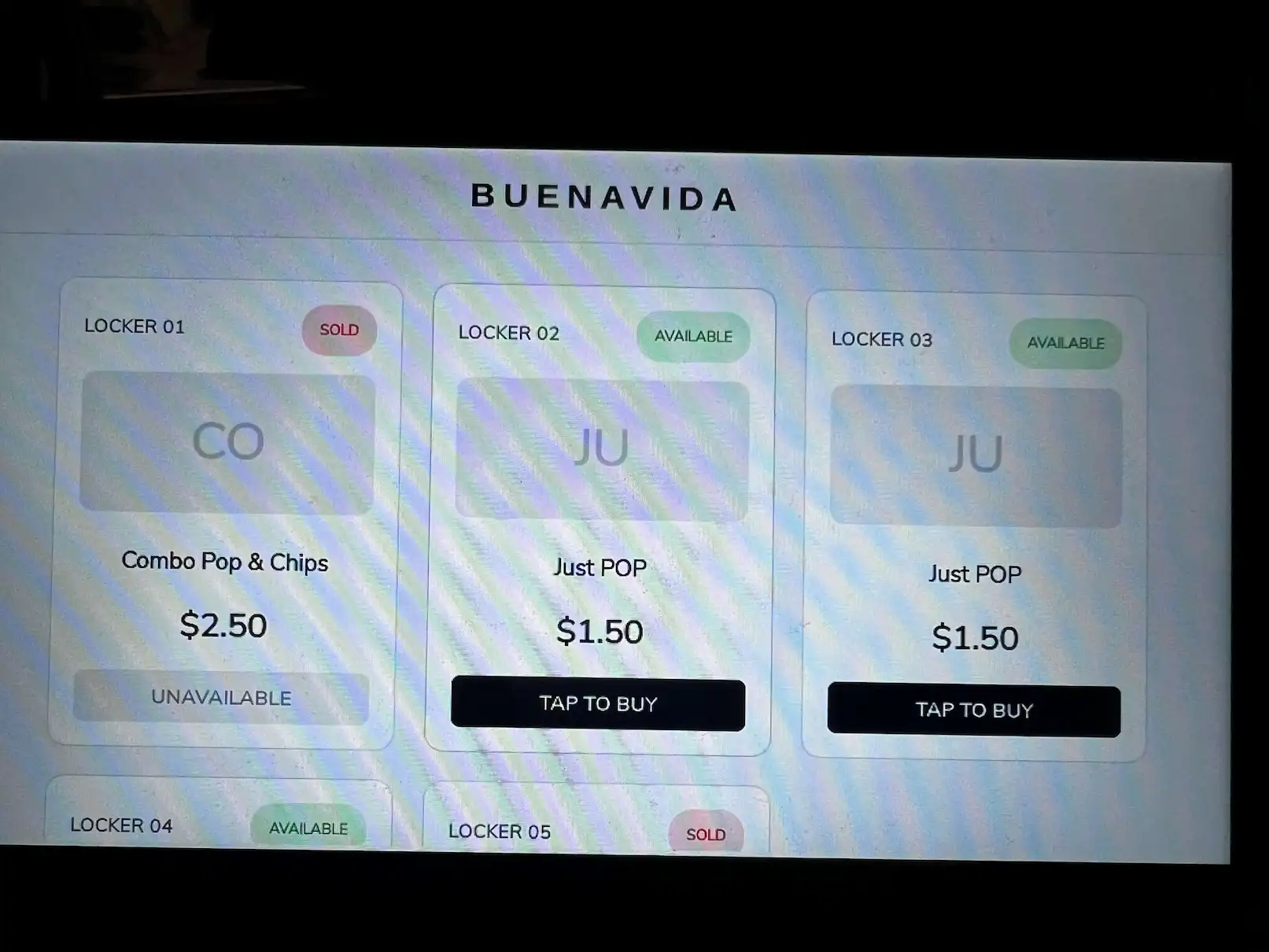

The Brief
BUENAVYDA came to us needing a local, offline, scalable unattended-retail platform — not a fixed locker product, but something customizable per location. The scope combined smart lockers for snack and beverage combos, integration with a Necta Krea coffee machine, unified payments across Nayax cashless and cash/coin, and one centralized touchscreen tying it all together.
A hard requirement from day one: full source-code ownership. BUENAVYDA needed editable Python, wiring diagrams, and documentation they could hand to another team if they ever needed to — not a black box.
That "customizable per location" requirement mattered more than it might sound. A gym lobby, an office break room, and a multi-unit residential building don't want the same combo of products at the same prices, and they don't necessarily have room for the same footprint of hardware. Rather than building one fixed configuration and shipping it everywhere, the brief called for a control platform where pricing, product mix, and locker count could all be reconfigured per site without touching the underlying code.
The render below is the vision that shaped the brief — a combined vending, coffee, and locker station. It's a prototype concept, not a deployed machine; the work described in this case study is the Raspberry Pi smart locker control platform we actually built and bench-tested toward that vision.
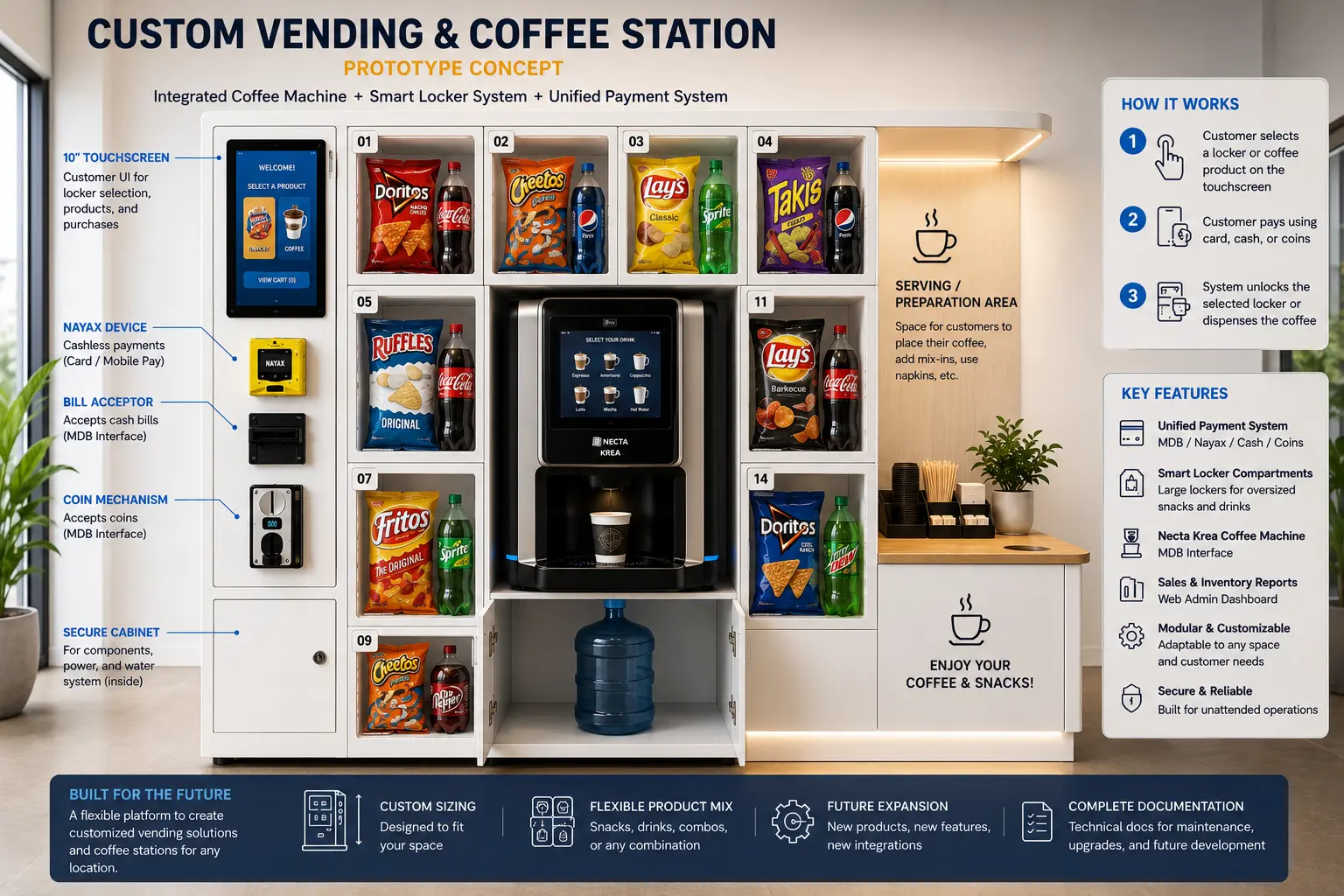
Prototype concept render of the BUENAVYDA vending, coffee, and smart-locker station.
The Solution — Offline-First by Design
We built the control platform around a Raspberry Pi 5 running the entire customer-facing experience locally: the touchscreen UI, the admin panel, and transaction logging all run on-device, with no cloud dependency for the machine to function.
We picked the Pi 5 over the Pi 4 mainly for headroom — driving a touchscreen UI, running the payment handler, and writing transaction logs at the same time is more comfortable with the extra CPU and memory, and it leaves room to add features later (a second display, a camera, more relay boards) without the controller becoming the bottleneck.
For unattended retail, that matters more than it sounds. A locker bank sitting in a gym or office lobby doesn't get a technician standing by if the internet drops. If the UI, the payment flow, or the lock control depended on a live connection to a remote server, a Wi-Fi outage turns into a dead machine and a lost sale. Keeping the touchscreen, the admin panel (reachable over the local network), and the transaction log all local means the locker keeps selling and keeps a record of every transaction regardless of what the building's internet connection is doing.
We chose to run the admin panel over the local network rather than a cloud dashboard for the same reason. It's reachable from any device on the same Wi-Fi network as the locker — no external hosting, no account system, no dependency on a third-party service staying online. It's a trade-off: there's no remote monitoring from off-site the way a cloud-connected system would offer. For a first deployment where the priority was a reliable, self-contained unit that BUENAVYDA fully owns the code for, that trade-off made sense.
Technical Architecture
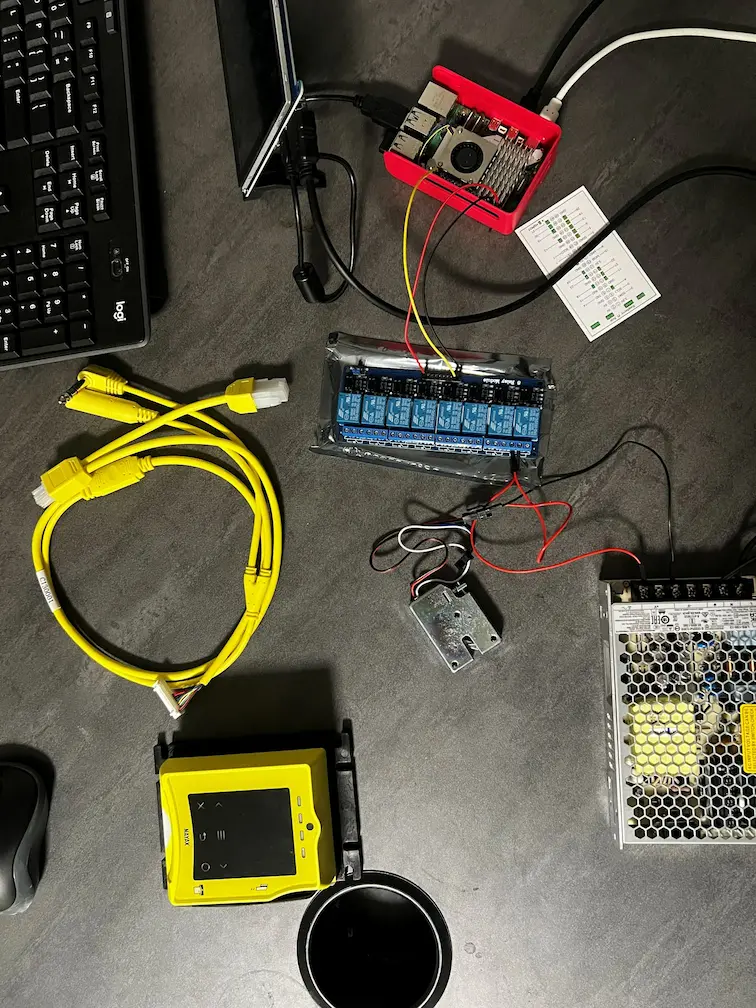
Bench build — Pi 5, relay HAT, solenoid lock, Nayax reader, and power supply.
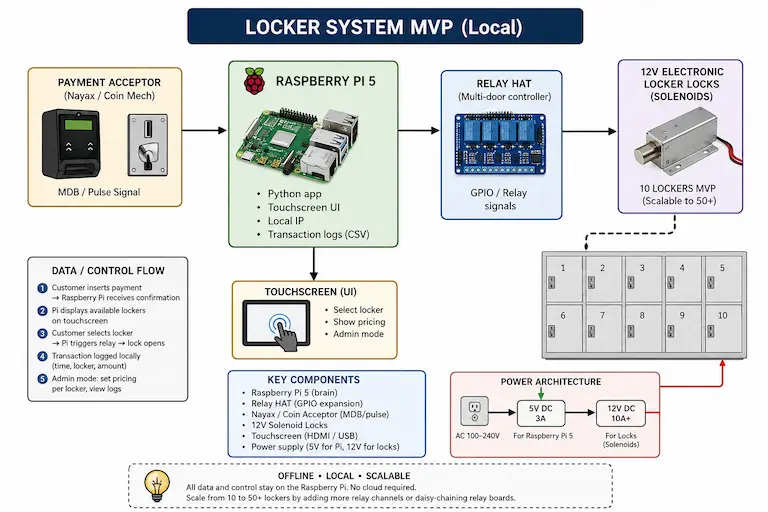
System architecture — controller, relay layer, locks, and payment paths.
The Pi 5 drives an 8-channel relay HAT over GPIO, and each relay switches a 12V solenoid lock on a locker door. Because the locks run on 12V and the Pi runs on 5V, the system needs dual-voltage power — a 5V/3A supply for the Pi and a separate 12V/10A+ supply for the lock bank. Payment comes in through two paths side by side: Nayax handles cashless card and contactless taps, while an MDB/pulse coin acceptor handles cash.
| Component | Spec | Purpose |
|---|---|---|
| Raspberry Pi 5 | 4GB/8GB | Main controller |
| Touchscreen | 7" test / 10" production | Customer UI |
| Relay board | 8-channel GPIO relay HAT | Lock control |
| Solenoid lock | 12V electronic | Locker door mechanism |
| Power | 5V/3A (Pi) + 12V/10A+ (locks) | Dual-voltage system |
| Payment | Nayax + MDB/pulse coin acceptor | Cashless + cash |
On the software side, the control logic is Python 3, with a Tkinter/Pygame touch UI running the locker grid and checkout flow. Transactions are logged locally to SQLite/CSV, and relay mapping and pricing live in an external JSON config rather than hardcoded values. The service is set to auto-start on boot via systemd, so the locker comes back up on its own after a power cycle without anyone needing to SSH in.
Each relay-to-locker mapping in the JSON config ties a GPIO channel to a locker number, a product entry, and a price. The touch UI reads that config at startup to build the locker grid, so a locker's price or contents can change without touching the Python code — only the config file. That separation between control logic and per-site data is what let us design this as a custom Raspberry Pi locker platform rather than a one-off script tied to a single site's hardware layout.
Key Features Delivered
Everything below runs on the same Pi 5 — there's no separate server or app handling the checkout flow behind the scenes.
Customer Touchscreen UI
The main screen shows a live locker grid — each cell reflects real-time availability, flipping to a SOLD state the moment a locker is purchased. Every combo shows its name and price directly on the tile, and buying one is a single tap. After purchase, the screen shows a countdown so the customer knows exactly how long the door will stay unlocked.
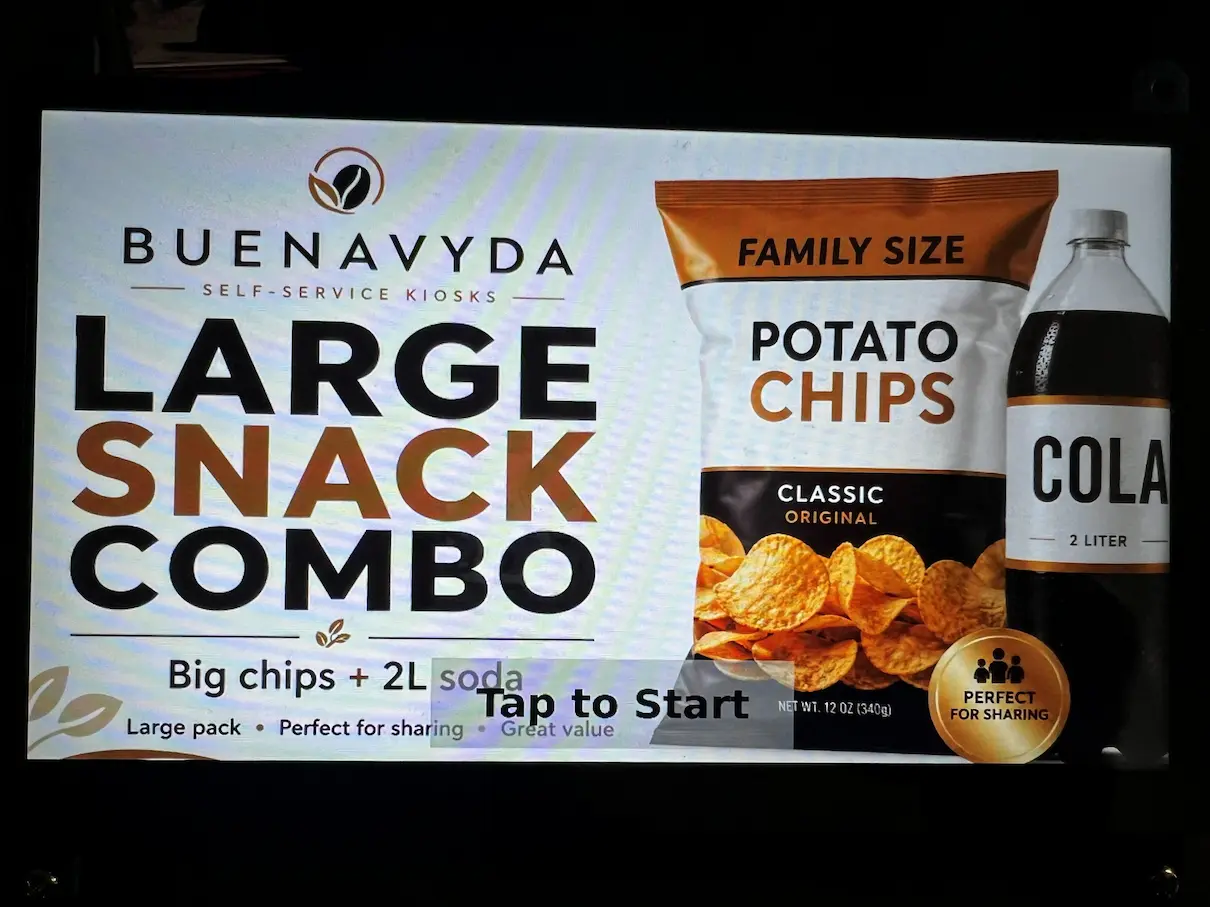
Product & Combo Screens
Selecting a locker drops into a product screen — for example, the "Large Snack Combo" view above — showing exactly what's inside before the customer commits to paying.
Admin Panel
Reachable over the local network from a laptop or phone on the same LAN, the admin panel lets a location operator enable or disable individual lockers, set per-locker pricing, run a manual relay test to confirm a lock fires correctly, review the transaction log, adjust the relay pulse time between 1 and 5 seconds, and add, edit, or remove products and combos — including uploading a thumbnail image for each.
The manual relay test button exists specifically for on-site troubleshooting — if a locker isn't dispensing, whoever is on-site can fire that relay directly from the admin panel and watch whether the physical lock responds, without needing to open a terminal or involve anyone remotely.
Engineered to Scale
Because relay-to-locker mapping lives in a JSON config rather than in the Python control logic itself, going from the 10-locker MVP to a 50+ locker installation doesn't require a code rewrite. It requires more relay channels — either additional relay boards or daisy-chained boards on the same Pi — and new entries in the config file. This is the core engineering decision that makes this Raspberry Pi smart locker case study relevant beyond BUENAVYDA's first pilot: the same codebase that runs 10 lockers today is the codebase that runs 50 lockers at the next location.
Challenges & Solutions
Solenoid Overheating Under Continuous Power
Electronic solenoid locks aren't built to stay energized indefinitely — holding them on for too long heats up the coil and shortens its life.
UI Scaling Across Screen Sizes
The touchscreen UI had to work on the 7" display used for bench testing and the 10" display planned for production, without two separate codebases.
Future Expansion Without Code Rewrites
BUENAVYDA needed a path from a 10-locker MVP to installations with 50+ lockers, without commissioning a new build every time the locker count changes.
Payments — Nayax Integration
Nayax handles cashless card and contactless payments, integrated alongside MDB-based coin and bill acceptance, so a customer can pay however they have money on them at that moment. Both payment paths are handled locally on the Pi — a transaction doesn't need a round trip to a remote server to unlock a lock.
Nayax and the MDB coin acceptor are wired as independent inputs into the same Python payment handler, which is what let us add Nayax cashless support without rewriting how the coin path already worked. Whichever path completes a payment, the handler triggers the same relay logic to fire the correct locker's solenoid — the payment method never changes how the lock itself is controlled.
What Our Client is Saying
"Great experience working with this developer. Professional, responsive, and easy to work with throughout the project. Everything is moving smoothly, and we already started discussing additional projects for future systems and machines. Definitely recommended."
Outcome
What exists today is a working offline-first Raspberry Pi smart locker MVP with live Nayax payments running end-to-end — locker selection, payment, unlock, and transaction logging, all handled on-device. The control architecture behind it was built from the start to scale to 50+ lockers on the same codebase, not just to run the initial pilot.
BUENAVYDA owns the full source code, the wiring diagrams, and the documentation for the system — nothing here is locked to us as a vendor. That was a deliberate part of how we scoped the engagement, and it's the same approach we take on other Raspberry Pi builds: the client should be able to hand this to a different team on day one if they ever need to, without starting over.
See the Pi-based hardware work behind this buildPlanning your own locker bank? See how we build smart locker systems