Smart locker system development
Smart lockers that open for the right person, even when the Wi-Fi is down.
We build the full smart locker system for a locker bank: the controller board and relays, the lock control software, the touchscreen, access and payments, and the backend you monitor it from. One team covers everything from the relay wiring to the payment screen.
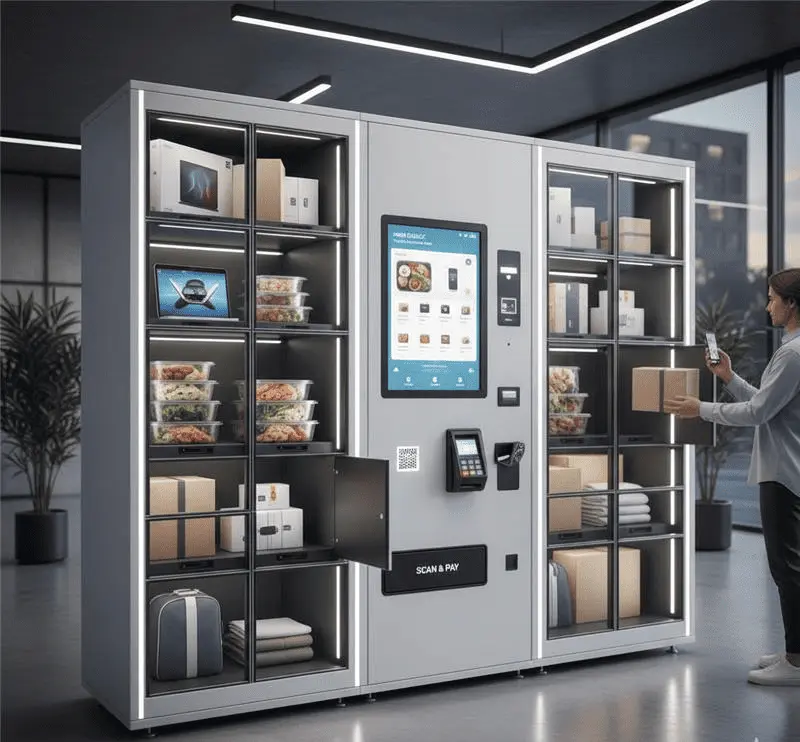


Five layers, one team.
An automated locker system is only as reliable as its weakest handoff. Most locker problems happen where two vendors' work meets: the payment terminal that doesn't talk to the lock controller, or the UI that doesn't know a door is jammed. We build every layer, so there's no handoff between them to go wrong.
Controller and lock hardware
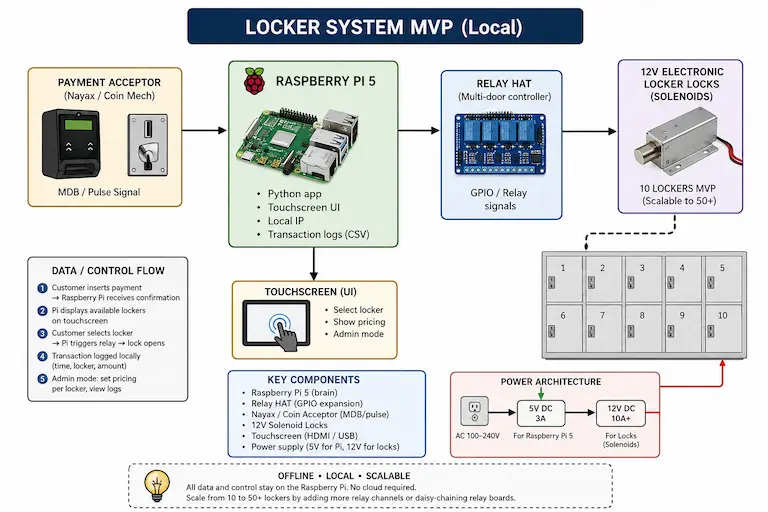
A Raspberry Pi 5 drives a relay HAT over GPIO, and each relay fires a 12V solenoid lock. We spec the dual-voltage power (5V for the Pi, a separate 12V supply sized for the lock bank) so a bank of doors opening doesn't brown out the controller.
Lock control software
Python control logic with relays defaulting to OFF at boot, a configurable unlock pulse, and automatic de-energising after every open. The service starts on boot via systemd, so a locker recovers from a power cut without anyone logging in.
Customer touchscreen
A live locker grid that shows availability, price and status per door, scaled to the panel you're using. We've shipped locker UIs in English, Mandarin and French, with locale-aware currency and number formatting.
Access and payments
Face recognition, RFID cards, one-time pickup codes, or pay-to-unlock through Nayax cashless and MDB coin and bill acceptance. Each method ends in the same relay call, so adding one doesn't touch how the locks are driven.
Admin panel and cloud backend
A local admin panel for on-site staff (enable or disable lockers, set prices, test a relay, read the transaction log), plus a cloud backend for remote monitoring when the deployment needs one. We've built locker backends in both PHP and Node.js.
Four ways to open a door, all shipped.
The right access method depends on who uses the locker and how often. One controller can run several methods at once.
Face recognition
Users are matched as they approach the locker bank, with no card or PIN. Built on OpenCV and the dlib-based face_recognition library, running on the Pi 5 and triggered per approach instead of streaming video all the time.
RFID cards
Tap a card or fob to open an assigned locker. A good fit when the same people use the same lockers every day and you already issue access cards.
OTP pickup codes
A one-time code opens one door, once. This is the usual pattern for pickup lockers where the person collecting never had an account.
Pay to unlock
Nayax cashless (card and contactless) running alongside MDB/pulse coin acceptance, both handled locally on the Pi, so a payment doesn't wait on a server before the door opens.
Two locker systems, two very different briefs.
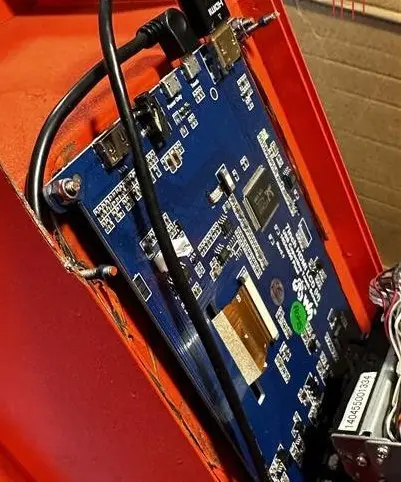
Photo supplied by the client from the deployed site.
Left-luggage lockers for tourists, opened by face
FZLockers runs left-luggage lockers next to busy tourist areas in the UK, the same idea as a railway cloak room. Their users are mostly visitors carrying bags who don't want to download an app, so the locker recognises them on approach instead of asking for a card or a PIN.
It's a Raspberry Pi access control system at heart: each bank runs on a Raspberry Pi 5 with a prebuilt relay HAT. Face recognition uses OpenCV and the dlib-based face_recognition library, triggered when someone approaches, which keeps the Pi within a response time that suits a locker door. Since most users are tourists, the touchscreen works in English, Mandarin and French. That meant proper Unicode rendering, layouts that leave room for longer French strings, and currency formatted per locale. Access events are logged locally in SQLite and synced to a cloud backend for remote monitoring.
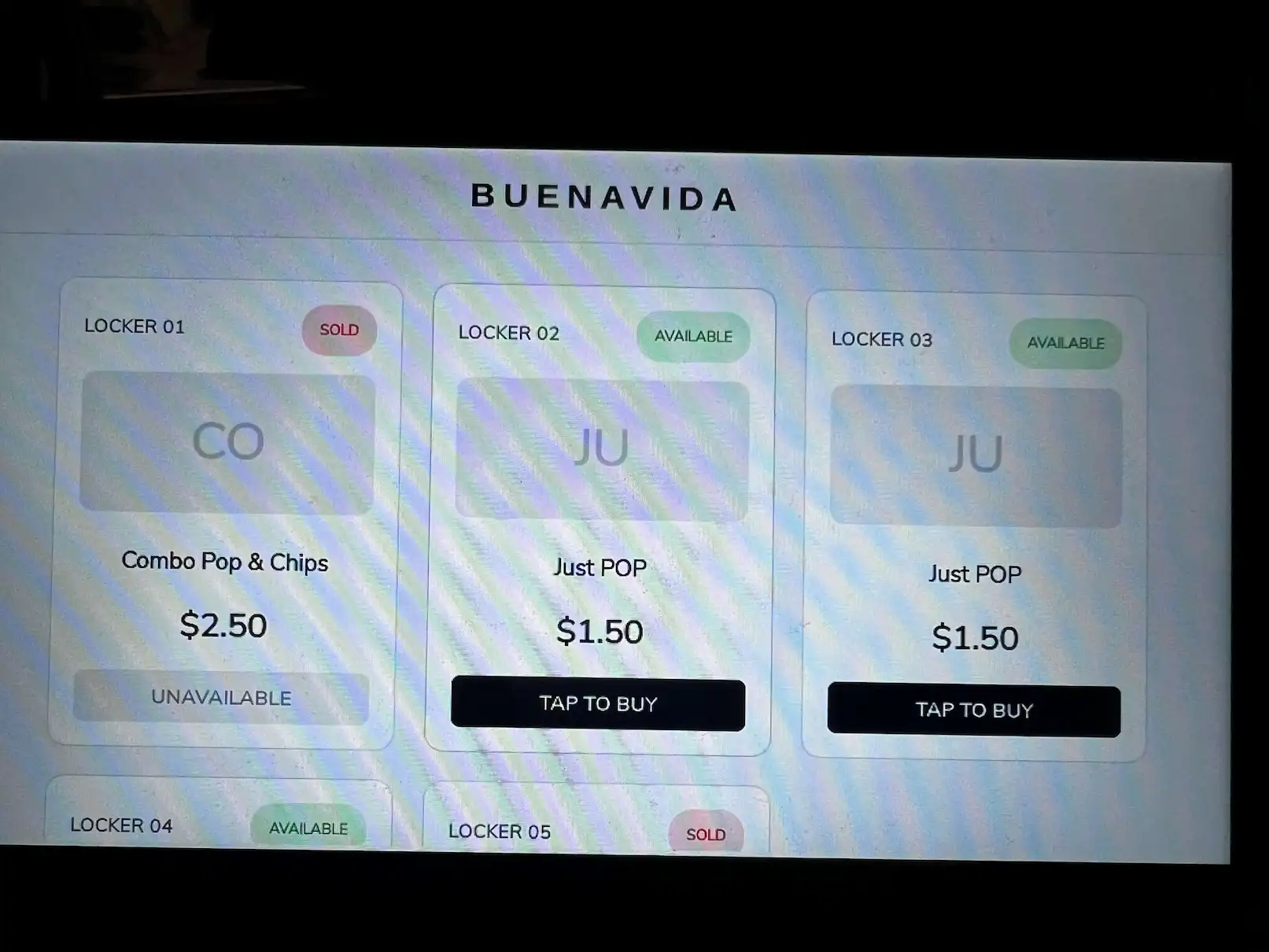
Pay-to-unlock lockers with Nayax and cash
BUENAVYDA wanted lockers that sell snack and drink combos, with a different product mix and price list at each site. We built an offline-first platform on a Raspberry Pi 5 with a custom relay HAT. It has a live touchscreen grid that marks a door SOLD the moment it's bought, Nayax cashless and MDB coin payments side by side, and an admin panel on the local network for site staff.
Door mapping and pricing live in config, so the MVP we bench-tested at 10 doors is built to run 50+ on the same code. BUENAVYDA owns the source, the wiring diagrams and the documentation. See how the BUENAVYDA locker platform was engineered.
What clients say about working with us.
The first review is from our smart locker client. The others are from Raspberry Pi and automation projects, labelled with the work they're about.
“Great experience working with this developer. Professional, responsive, and easy to work with throughout the project. Everything is moving smoothly, and we already started discussing additional projects for future systems and machines. Definitely recommended.”
“We needed a skilled Raspberry Pi developer for a high-stakes project, and DigitalMonk delivered beyond expectations. Their dedicated testing lab and extensive inventory ensured rapid prototyping and flawless execution. A truly professional experience.”
“It has been an absolute pleasure working with Digital Monk on our recent automation project. From start to finish, they demonstrated exceptional technical skill, creative problem-solving, and a deep commitment to delivering quality results.”
The stack behind our locker builds.
Everything listed here has run in a locker we've delivered. We pick hardware that's easy to buy again, which matters as soon as a pilot becomes a second site.
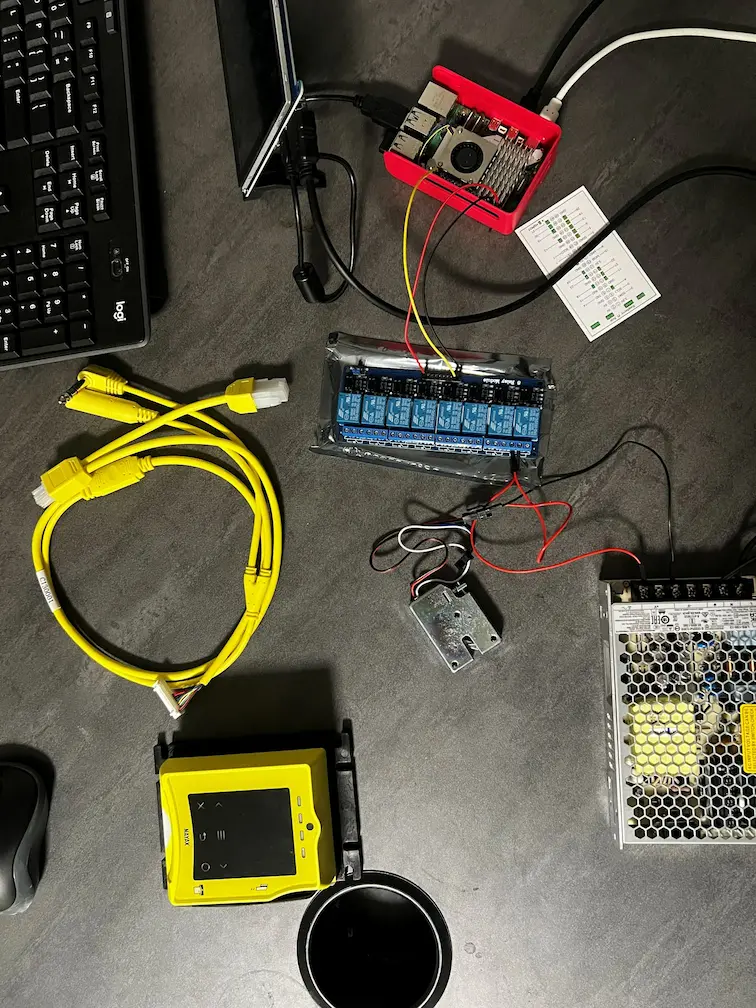
| Component | Spec | Why it's there |
|---|---|---|
| Raspberry Pi 5 | 4GB / 8GB | Main controller: UI, payments, logging, lock control |
| Relay HAT | 8-channel, GPIO-driven, chainable | Switches one lock per channel |
| Solenoid lock | 12V electronic | Door mechanism, pulsed, never held on |
| Touchscreen | 7" bench / 10" production | Customer UI |
| Power | 5V/3A (Pi) + 12V/10A+ (locks) | Separate rails so lock surges don't reset the Pi |
| Payment | Nayax + MDB/pulse coin acceptor | Cashless and cash, handled locally |
Controller and hardware
- Raspberry Pi 5 (4GB / 8GB)
- Relay HAT over GPIO (prebuilt or custom)
- 12V solenoid locks
- 5V/3A + 12V/10A+ dual-rail power
- 7" and 10" touchscreens
- Camera module for face recognition
- RFID readers
On-device software
- Python 3
- Tkinter / Pygame touch UI
- SQLite and CSV transaction logs
- JSON config for relay mapping and pricing
- systemd auto-start and recovery
- Local-network admin panel
Access and vision
- OpenCV
- face_recognition (dlib)
- RFID card and fob access
- One-time pickup codes (OTP)
Payments
- Nayax cashless (card and contactless)
- MDB coin and bill acceptors
- Pulse coin acceptors
Cloud and admin
- PHP backend
- Node.js backend
- Event sync from device to cloud
- Remote monitoring dashboard
Localisation
- English, Mandarin and French UIs
- Unicode rendering for CJK text
- Per-locale currency and number formats
What we decide early, and why.
Raspberry Pi 5, not a microcontroller
An ESP32 can switch relays well. A smart locker also needs a local database for access and transaction logs, a web server for the admin panel, permission rules, and sometimes a camera pipeline. On a Pi that's ordinary Python on Linux. On a microcontroller it's months of custom firmware. We use the Pi 5 over the Pi 4 for headroom when the UI, payment handler and logging all run at once.
Offline-first, then sync
Nobody is standing next to a locker bank waiting to fix it when the building Wi-Fi drops. The UI, payments, lock control and logs all run on the device, so the locker keeps working. Where a cloud backend exists, it receives events. It isn't something the door has to ask before it opens.
Never hold a solenoid energised
Solenoid locks aren't rated to stay powered. Hold them on and the coil heats up and fails early. Every unlock is a timed pulse (configurable, typically 1–5 seconds), followed by an automatic release.
Locker layout lives in config, not code
Relay-to-door mapping, pricing and product data sit in an external config file. Going from a 10-door pilot to a bank of 50+ doors means adding relay channels and config entries. The control code stays the same.
Problems we've already solved for you.
Each of these came up in a real locker build. You won't see most of them in a demo, but every one matters once the lockers are in daily use.
Solenoids overheat if you hold them open
Electronic solenoid locks aren't built to stay energised. A door held unlocked for a long time heats up the coil and shortens its life.
One UI, two screen sizes
A 7" panel for bench testing and a 10" panel in production, with no budget for two codebases.
Longer text, different scripts
A UI designed in English breaks when French strings run 20–30% longer and Mandarin needs proper CJK rendering.
When a door doesn't open, someone on site needs to know why
An unattended locker with a stuck door is a support call, and usually nobody on site has a terminal.
Same lock hardware, different jobs.
Left-luggage and tourist lockers
Short-stay bag storage near stations and attractions, where users don't speak the local language and won't install an app.
Pickup lockers
Orders or items left for collection, opened with a one-time code sent to the person collecting.
Staff and equipment lockers
Assigned lockers opened with the RFID cards a workplace already issues, with an access log per door.
Locker-vending combos
Each door holds a product bundle and payment unlocks it. Same lock hardware, with retail software on top.
If your lockers sit next to a full vending machine, or you're converting one, our vending machine software work covers the retail side.
From brief to a door that opens.
Brief and site
Door count, access methods, payment hardware, power and network at the site, and who maintains it.
Bench build
Controller, relays, a lock and the payment reader wired on the bench, so the full flow from tap to unlock is proven before anything goes into a cabinet.
Software and UI
Touchscreen flow, admin panel, access rules and the backend, tested on the actual panel sizes you'll deploy.
Install and handover
Wiring diagrams, config, documentation and source code. You own it, and another team can pick it up.
Need engineers embedded in your own team instead? Hire our Raspberry Pi developers directly.
Smart locker questions.
Usually, yes. If the cabinet has electronic locks (or room to fit 12V solenoids), the control system is a Raspberry Pi, a relay HAT, a power supply and a touchscreen. We map relays to doors in config, so the software doesn't care how your cabinet is laid out.
We've shipped face recognition, RFID cards, one-time pickup codes, and pay-to-unlock through Nayax cashless and MDB coin acceptance. A single locker can support more than one method, because every method ends in the same relay call.
The locker keeps working. We design lockers offline-first: the UI, payments, lock control and logs all run on the device. Any cloud backend receives the events when the connection comes back. It's never in the path of a door opening.
Our locker platform is built to scale from a 10-door pilot to 50+ doors on the same codebase, by adding relay channels and config entries. The practical limit is usually GPIO and power planning, not software.
Yes. Our UK left-luggage lockers run in English, Mandarin and French for tourist users. Proper multi-language support means Unicode rendering, layouts sized for the longest language, and per-locale currency formatting, not just a translated string table.
If it's Nayax, or a coin or bill acceptor that speaks MDB or pulse, yes. We've integrated both side by side on the same locker. For other terminals we check the integration options before quoting.
Yes. You get the full source, the wiring diagrams and the documentation. Nothing is locked to us as a vendor.
Planning a locker bank? Let's spec it.
Tell us the door count, how people should get in, and where it's going. We'll come back with a hardware list, an approach and a realistic timeline.