Case Study: An ESP32-S3 Voice Reminder Device That Keeps Working Offline
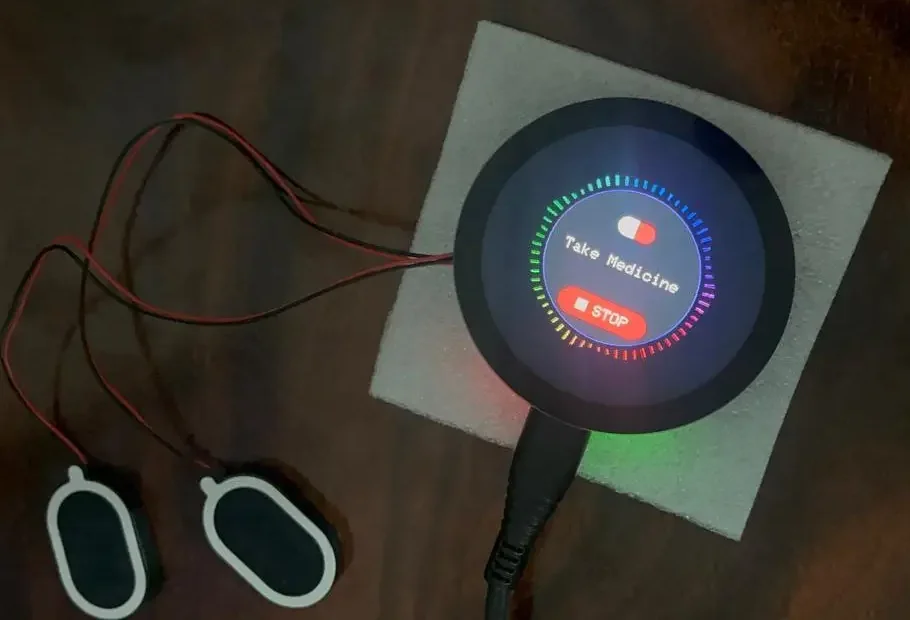
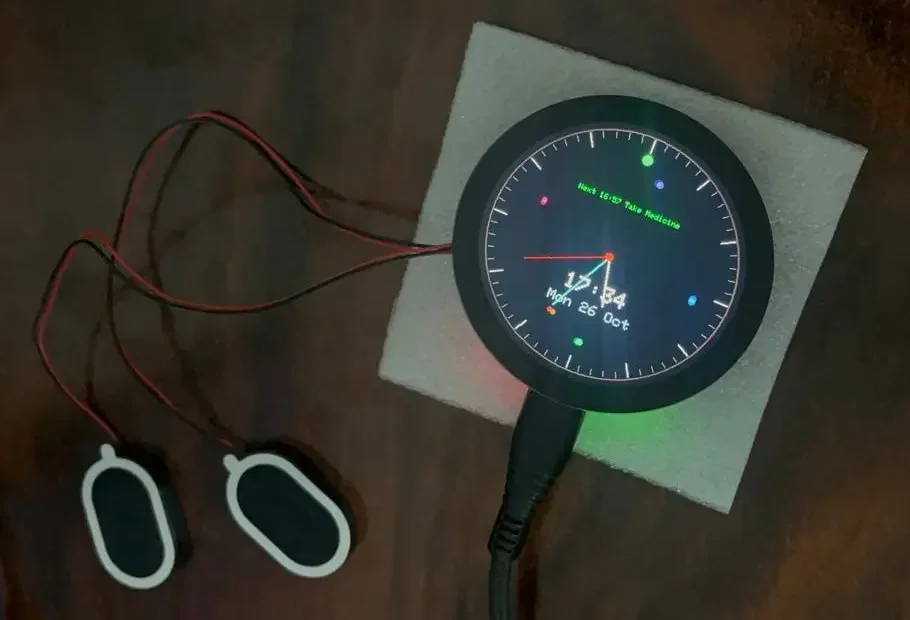
Daily Companion is a round-screen desk device that speaks a reminder in a voice the user already knows. Instead of a beep, it plays a clip the family recorded, such as "take your medicine", while the display shows an icon and a title and a single touch on STOP silences it. Tirtha, our client, wanted it to work for things people cannot afford to miss, which meant the reminders had to keep firing even when the home network did not. We wrote the complete firmware for it: board bring-up, a BLE setup path, an embedded web interface, a browser-side audio pipeline, and a WiFi state machine built around the idea that the network is optional.


The Client's Challenge
Medication, hydration and routine reminders usually fail for a simple reason: a phone notification is easy to swipe away, and for elderly users it is easy to miss altogether. The idea behind Daily Companion was a dedicated object that sits on a desk, says what to do in a familiar voice, shows clearly what the reminder is for, and stops with one tap.
Because the reminders could be for medication, reliability came before everything else. A router reboot, a weak signal or a changed WiFi password could not be allowed to silence one.
Technical constraints
- One off-the-shelf board: no custom PCB, nothing added beyond a speaker
- No hard-coded WiFi: setup had to work from a phone, with no app for us to build
- Limited storage: about 10 MB of flash for every voice clip
- Shared radio: WiFi and BLE on the same chip at the same time
- Hidden hardware details: the touch controller and LCD reset were not where we expected
The Engineering
The device is built on the Waveshare ESP32-S3-Touch-LCD-1.85. We chose a ready-made board because the client's product was the behaviour, not the hardware, and it let the effort go into firmware instead of board spins. The cost is that you inherit details you did not design, so the work runs in five stages.
Board bring-up
- ST77916 round display over QSPI, with a 360×360 framebuffer held in PSRAM so the screen redraws at roughly 30 frames per second
- The LCD reset is not on a plain GPIO. It goes through a TCA9554 IO expander (I2C 0x20), so the expander must be initialised and reset pulsed before the display responds
- The CST816 touch controller sits on its own I2C bus (SDA pin 1, SCL pin 3, address 0x15) and only answers while touched. An idle scan finds nothing, which looks like a dead chip until you scan while pressing the screen
- Audio leaves the board over I2S to the amplifier and speaker
Firmware architecture
- C++17 on the Arduino framework with PlatformIO
- Reminder scheduler at minute resolution, with weekday masks and one-time dates, up to 32 reminders stored in NVS
- A dedicated audio task streams WAV files from LittleFS to I2S with pause, resume and seek, so a long clip never blocks the display or the scheduler
- NTP time with POSIX time zone strings
Each reminder carries a key built from the day of the year and the minute, so it fires once and never twice, and a one-time reminder switches itself off after it plays. Nothing in this path touches the network, which is why the rest of the design looks the way it does.
main.cpp — the per-minute reminder check
static void checkReminders() {
  tm t;
  if (!timeValid(t)) return;
  int32_t key = t.tm_yday * 1440 + t.tm_hour * 60 + t.tm_min;
  for (auto &r : reminders) {
    if (!r.enabled || r.lastKey == key) continue;
    if (r.hh != t.tm_hour || r.mm != t.tm_min) continue;
    if (r.date.length() ? !dateIs(r, t)
                        : !(r.days >> t.tm_wday & 1)) continue;
    r.lastKey = key;
    // one-time reminders switch off after firing
    if (r.date.length()) { r.enabled = false; saveReminders(); }
    audioPlay(audioPath(r.file), r.repeat);
    displaySetState(UI_PLAYING, r.title, "", r.icon);
  }
}BLE setup with NimBLE
- A custom GATT service: the phone writes the SSID and password as JSON or as two lines of text from a generic tool such as nRF Connect
- The device notifies back with
connecting,connected:<ip>orfailed - Credentials are written to flash only after a successful connection, so a mistyped password is never stored and cannot lock the device out
- WiFi modem sleep stays enabled while BLE runs on the ESP32-S3, otherwise the radio stack aborts
We chose BLE over a SoftAP page because it needs no network switching on the phone, and over a mobile app because the client did not need one. For the general background, see how BLE provisioning works on the ESP32.
NimBLE-ArduinoGATTBLE and WiFi togetherPhone to device, then status notifications
// Write (UTF-8), JSON form
{"ssid":"MyWiFi","pass":"MyPassword"}

// Notify, in order
connecting
connected:192.168.x.x // or: failedEmbedded web interface and browser audio pipeline
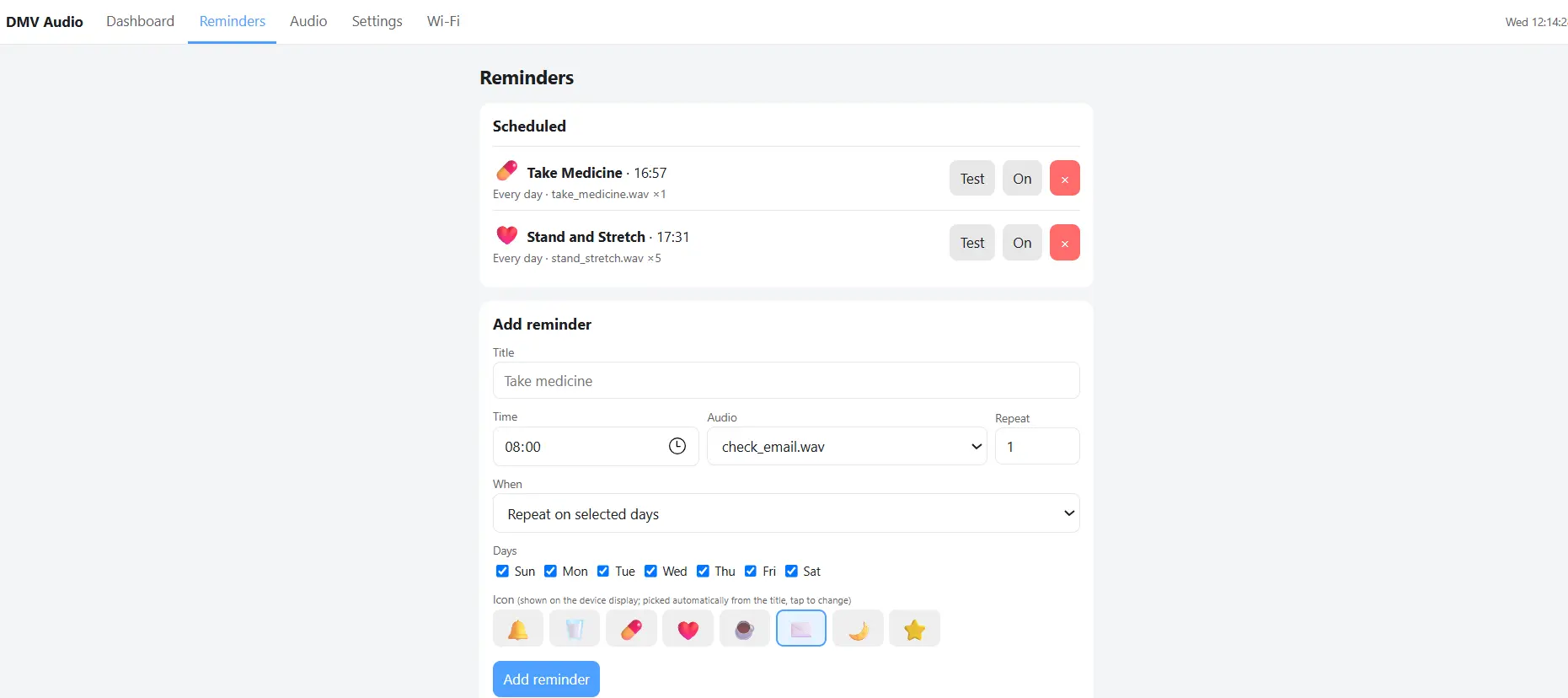
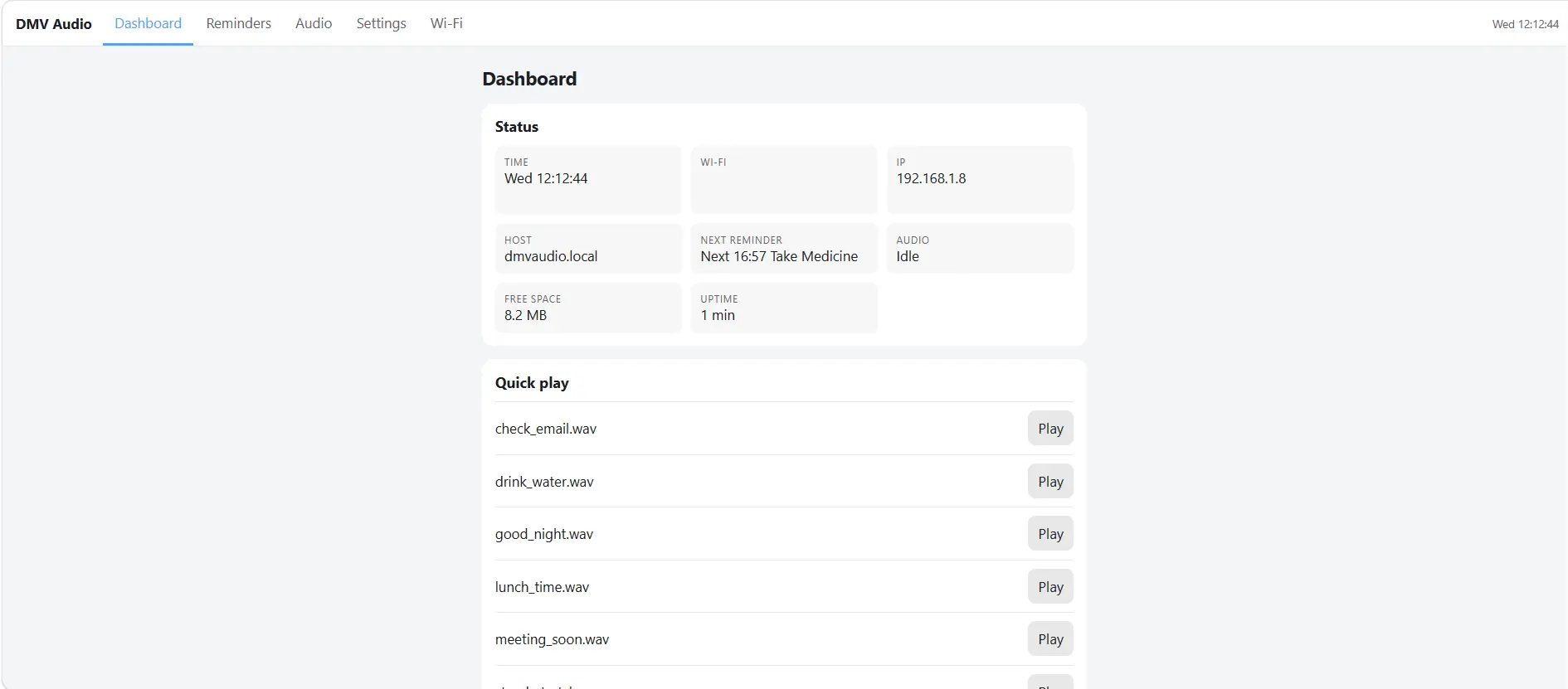
- Five pages served by the firmware at
dmvaudio.local: Dashboard, Reminders, Audio, Settings and Wi-Fi. No account and no cloud service - Uploads in mp3, m4a, ogg or wav are decoded in the browser, downmixed to mono, resampled and sent as a 16-bit WAV, so the chip never needs a decoder
- Upload progress with cancel; a half-uploaded file is never kept, which matters with about 10 MB to work with
- A JSON HTTP API exposes the same reminders and playback for scripting
WiFi resilience
- The clock and scheduler run from the already-synced time, so reminders do not need the network at all
- The device retries the saved network every 30 seconds, and after two minutes without WiFi it opens BLE setup in the background
- At boot it uses fast-connect with the remembered channel and router address, getting back to a synced clock in about five seconds
- Network changes are transactional: if a new network fails, the device returns to the old one instead of ending up on neither
The principle is that WiFi is a management channel, not a dependency. It is why ESP32 firmware written for a device people rely on spends as much effort on failure paths as on features.
Clock and reminders stop
Reminders keep firing on time
The Device and Its Web Interface
Tech Stack
Every layer below was chosen to keep the important behaviour on the device and everything optional off it.
| Layer | What we used | Why |
|---|---|---|
| Board | Waveshare ESP32-S3-Touch-LCD-1.85 (16 MB flash, 8 MB PSRAM) | Round touch display and ESP32-S3 in one ready-made module |
| Display and touch | ST77916 over QSPI, CST816 touch, TCA9554 IO expander | What the board provides; each needed its own bring-up |
| Firmware | C++17, Arduino framework on PlatformIO | Fast iteration with proven ESP32-S3 libraries |
| Audio | WAV from LittleFS to I2S amplifier and speaker | No on-chip decoder; conversion happens in the browser |
| WiFi setup | NimBLE-Arduino with a custom GATT service | No credentials in firmware and no app to build |
| Management | Embedded web interface and JSON HTTP API | Any browser works; no cloud service |
| Time and storage | NTP with POSIX time zones; settings in NVS | Reminders run from synced local time |
What This Project Taught Us
Scan while you interact
Some peripherals, like the CST816 touch controller, only respond while in use. A silent I2C scan does not mean a dead chip.
Move heavy work off the device
Converting audio in the browser removed the need for an on-chip decoder and kept the playback task simple and reliable.
Design for network loss first
Treat WiFi as a management channel, not a dependency. Core functions should run on local state.
BLE and WiFi need careful coexistence
On the ESP32-S3, WiFi modem sleep must stay enabled while BLE is active, or the radio stack aborts.
Production Reality
We want to be precise about what this project is. It was a firmware engagement on Waveshare's own module, so there was no custom PCB, no enclosure and no batch fabrication. We delivered two working prototype units, flashed with the finished firmware and tested before they were shipped. The photos on this page show that hardware: the board, a pair of small speakers and a USB cable.
What the project demonstrates is firmware depth on a part we did not design: finding the reset line behind an IO expander, a touch controller that hides from a normal scan, two radios sharing one chip, and a device that has to keep its promises when the network does not. Mass production has not happened yet, and we do not claim it. When it does, the same firmware moves to whatever hardware the client chooses.
Client Outcome
Tirtha received two working Daily Companion units that speak reminders in her chosen voice, show clearly what each one is for, set up from a phone over BLE, and keep running through WiFi outages. In her words:
"Digital monk did an incredible job, and delivered the working prototype. We definitely hire them after our funding round for mass production."
Tirtha
What This Proves
A product built on a ready-made board still needs real engineering when it has to be dependable. Board bring-up, wireless setup, audio, a web interface and failure handling all landed in one firmware, written by one team. It is the same approach we use on embedded software for products built on an existing module and, with a custom board, on our Bible audio player with its own PCB.
Have a Connected Device Idea?
Whether you need firmware for an off-the-shelf board or a custom ESP32 design from scratch, DigitalMonk can turn your idea into working hardware.